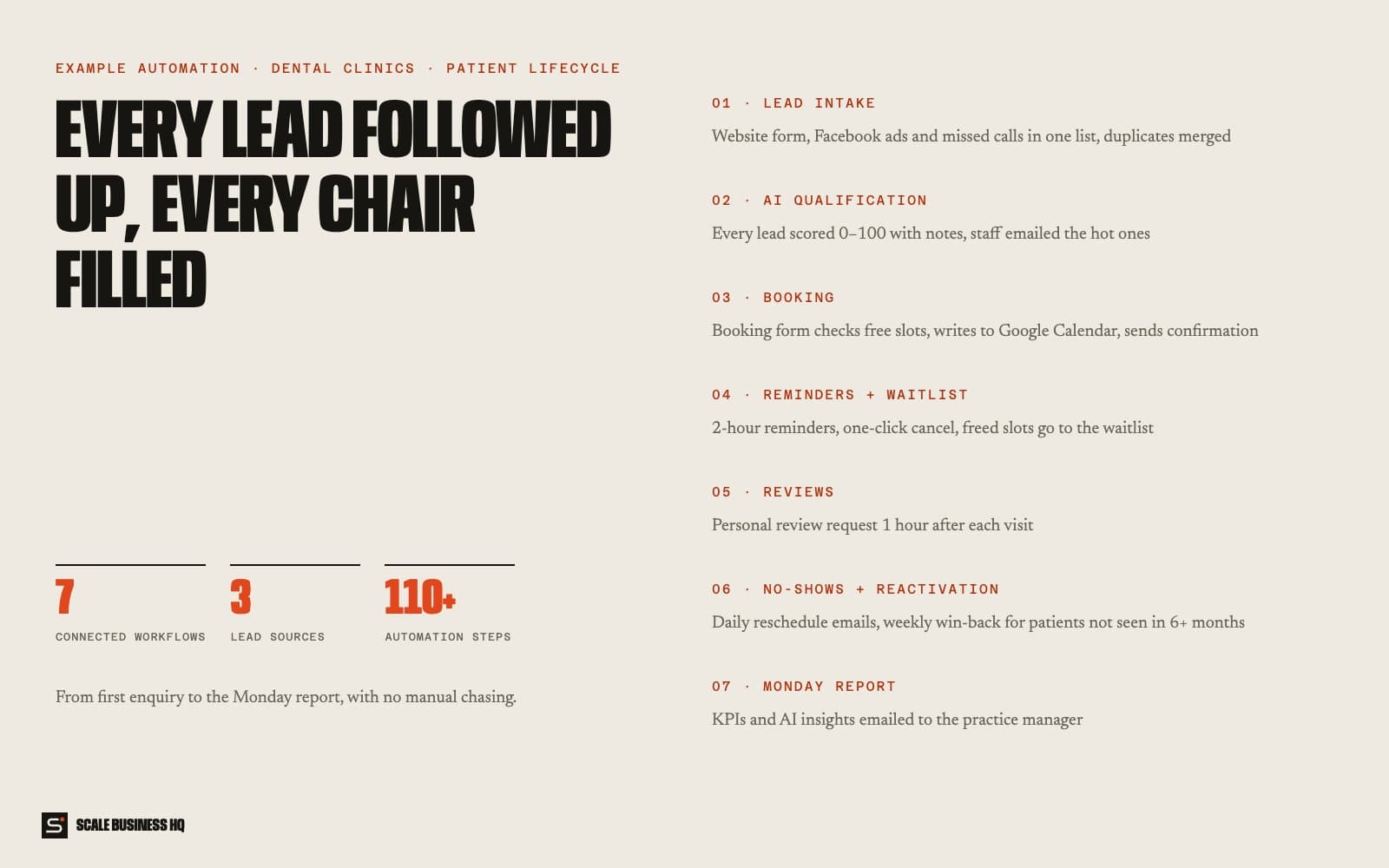
Every lead followed up, every chair filled: a dental patient automation
01 — The challenge
Most practices lose patients in the gaps. A Facebook enquiry sits unanswered over the weekend, a missed call never gets a callback, a cancelled slot stays empty, and nobody chases the patient who hasn't been in for a year. None of it is anyone's job, so it doesn't happen.
- 7connected stages
- 3lead sources in one list
- 2 hrsbefore: reminder sent
- Weeklywin-back and report
02 — How it works, step by step
CustomerAISystemYour team
- 01Customer
Enquiries arrive from everywhere
Website forms, Facebook ads and missed calls all land in one list, with duplicates merged.
- 🌐 Website formImplant consultation enquiry
- 📣 Facebook adInvisalign offer lead
- 📞 Missed callNumber saved for a callback
- 02AI
Each lead is scored so the desk knows who to call first
AI reads each enquiry and gives it a score with a short note. The hottest ones are emailed to staff straight away.
- 92 · Implant consultReady to book, asked about finance
- 61 · WhiteningComparing prices
- 24 · General questionNo timeline
- 03System
A booking form that books
Patients pick a free slot, the appointment goes into the calendar and a confirmation is sent.
- 04System
Reminders, and cancelled slots refilled
Two hours before, a reminder with one-click cancel goes out. If someone cancels, the slot is offered to the waitlist automatically.
- 2 hours before: reminder with cancel link
- Cancelled: slot offered to the waitlist
- Waitlist patient takes the slot
- 05System
A personal review request after each visit
An hour after the appointment, the patient gets a short, personal review request.
- 06System
No-shows followed up, lapsed patients invited back
The day after a no-show, a friendly rebooking message. Once a week, everyone not seen in six months gets a personal invitation back.
- 07Your team
A Monday report for the practice manager
Bookings, no-shows, reviews and lead sources, with short AI notes on what changed.
Monday report (sample)- New leads
- 34
- Booked
- 19
- No-shows
- 3 (all messaged)
- Win-backs sent
- 41
- Reviews requested
- 52
Names, messages and figures in these examples are fictional sample data.
03 — What it changes for your business
Every enquiry followed up
Nothing waits in an inbox over the weekend.
Fewer empty chairs
Reminders and the waitlist turn cancellations into new bookings.
Lapsed patients come back
Regular, personal invitations reach patients who drifted away.
One clear weekly picture
The practice manager sees what's working without building a spreadsheet.
04 — What you need
You provide
- Your treatments and appointment lengths
- Message wording in your clinic's voice
- Your review link
Accounts we connect
- Website form and Facebook lead ads
- Calendar and patient list
- Email or text for reminders
Decisions to make
- What counts as a hot lead
- How long before someone counts as lapsed
- Who gets the Monday report
05 — How set-up works
- Day 1
Discovery call
We go through how you work today, what the automation should handle and what it must never do.
- Week 1
Build and connect
I connect your lead sources, calendar and messaging, and write each message in your clinic's voice.
- Week 2
Test together
We run test leads, bookings, cancellations and no-shows through every stage before anything reaches a patient.
- End of week 2
Go live
It goes live with real customers. I watch the first week closely and adjust the wording and rules.
06 — Questions owners ask
Do I need new practice software?
No. The workflows sit around the tools you already use.
Can I turn parts on one at a time?
Yes. Many clinics start with reminders and the waitlist, then add win-back and reporting.
What if it gets something wrong?
It works from your own information, hands over anything it isn't sure about, and every conversation is logged so you can see exactly what was said and fix the rule.
What does it cost to run?
Running costs are the messaging and AI usage, usually a small monthly amount at a small business's volume. Set-up is a one-off cost. I give a fixed quote after the discovery call.
Want to see this working for your business?
Book a live walkthrough